Configuration
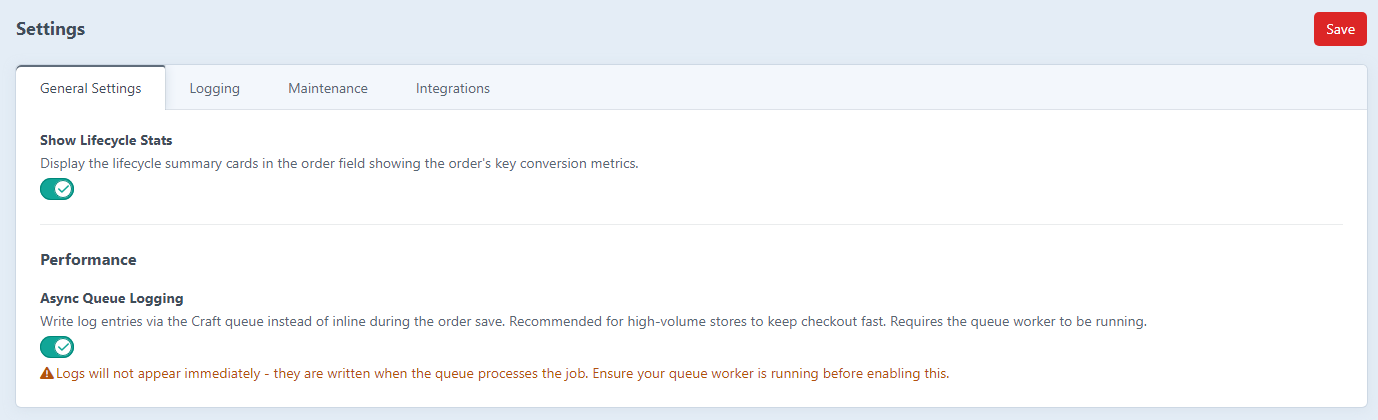
Order Lifecycle is configured through the Craft control panel. Head to Settings → Order Lifecycle to adjust all the settings.
Permissions
For a non-admin to see the Order Lifecycle section in the control panel, their user group needs the built-in Access Order Lifecycle permission. Grant it under Settings → Users → (group) → Permissions. Admins always have access.
Two further permissions unlock the sub-pages, and only take effect once the group already has Access Order Lifecycle:
| Permission | What it allows |
|---|---|
| Access Order Lifecycle | See the section and the Overview dashboard |
| Export lifecycle events | Use the Export page and download CSVs |
| Generate AI insights | Use the AI Insights page and generate insights |
Plugin settings stay admin-only.
Event Logging
These toggles control which event categories are recorded. All are enabled by default except "Log All Payment Transactions".
| Setting | Default | Description |
|---|---|---|
| Log Line Item Changes |
true | Cart line item additions, removals, and quantity updates |
| Log Order Status Changes |
true | Order status transitions |
| Log Order Complete Event |
true | When an order is marked as complete |
| Log Order Paid Event |
true | When an order is fully paid |
| Log Email Sent Events |
true | Order-related emails sent and failed |
| Log Coupon/Discount Changes |
true | Coupon codes applied or removed |
| Log Address Changes |
true | Shipping and billing address set or removed |
| Log Customer Changes |
true | Customer email set or removed |
| Log Shipping Method Changes |
true | Shipping method selected or changed |
| Log Payment Attempts |
true | Each payment attempt |
| Log Payment Authorized |
true | Payment authorization events |
| Log Payment Captured |
true | Payment capture events |
| Log Payment Refunded |
true | Refund events |
| Log All Payment Transactions |
false | Every individual transaction state change (high volume - off by default) |
Performance
| Setting | Default | Description |
|---|---|---|
| Async Queue Logging |
false | Write log entries via the Craft queue instead of inline during the order save |
By default every log entry is written synchronously inside Commerce's afterSave transaction. On a low-to-medium volume store you won't notice it at all. On a high-volume store - flash sales, lots of concurrent checkouts, large carts - it can add measurable latency to checkout.
If you're deploying to a busy or commercially important store, read the dedicated Performance guide before going live - it covers async logging, which event categories to disable, retention, and exactly what this plugin does and doesn't touch on the checkout path.
You can also set this in config/order-lifecycle.php to enforce it environment-by-environment:
'asyncLogging' => App::env('QUEUE_LOGGING') === 'true',Data Collection
| Setting | Default | Description |
|---|---|---|
| Collect User IP Address |
true | Store the IP address of the user who triggered each event |
| Collect User ID |
true | Store the logged-in user ID alongside each event |
Turn these off to reduce the amount of personally identifiable information stored in logs, if you need to stay on the right side of GDPR or similar privacy regulations.
Display
| Setting | Default | Description |
|---|---|---|
| Show Lifecycle Statistics Widget |
true | Show the statistics dashboard widget |
Log Pruning
| Setting | Default | Description |
|---|---|---|
| Auto-Prune Logs After (Days) |
0 | Automatically delete logs older than this many days. 0 disables pruning. Maximum 365. |
Pruning runs on the next request after midnight. You can also trigger it manually via the console:
php craft order-lifecycle/logs/purge --days=90Integrations
Anthropic API Key
You'll need this to enable AI Insights. Generate a key at console.anthropic.com and add it to your environment:
ANTHROPIC_API_KEY=sk-ant-...Set the Anthropic API Key field in Settings → Order Lifecycle → Integrations to $ANTHROPIC_API_KEY, or configure it directly in config/order-lifecycle.php:
'anthropicApiKey' => '$ANTHROPIC_API_KEY',Once that's set, a Generate insights button appears in the Order Lifecycle field on every order, and the Order Lifecycle AI Insights dashboard widget becomes available. Leave the field blank if you'd rather switch off all AI features.
Per-Order Insights Style
Settings → Order Lifecycle → Integrations → Per-Order Insights Style controls how a single order's AI analysis is presented: Structured (a priority-action callout plus labeled Action / Info / Good cards - the default) or Narrative (a plain markdown summary). This only affects per-order insights, not the store-wide dashboard widget. Set it in config/order-lifecycle.php with:
'orderInsightsStyle' => 'structured', // or 'narrative'AI Prompt Customisation
The prompts sent to Claude can be overridden in Settings → Order Lifecycle → Integrations → AI Prompt Customisation. Each field takes free text with {placeholder} tokens that get swapped out for live data before the request goes off. Leave a field blank to fall back on the built-in default.
| Setting | Description |
|---|---|
| Per-Order Insights Prompt | Prompt used when the AI Insights button is clicked on an individual order |
| Store Insights Prompt | Prompt used by the dashboard AI Insights widget |
Can also be set in config/order-lifecycle.php:
'orderInsightsPrompt' => 'Your custom prompt with {total}, {eventTimeline}, etc.',
'storeInsightsPrompt' => 'Your custom store prompt with {days}, {conversionRate}, etc.',
See the AI Insights guide for the full list of tokens available for each promp
Console Commands
The plugin also gives you console commands for log management, independent of the CP settings:
# Delete logs older than 90 days
php craft order-lifecycle/logs/purge --days=90

# Dry run (shows count without deleting)
php craft order-lifecycle/logs/purge --days=90 --dry-run

# Delete logs for orders that no longer exist (deleted or trashed)
php craft order-lifecycle/logs/purge-orphaned

# Dry run orphan cleanup
php craft order-lifecycle/logs/purge-orphaned --dry-run

# Show log statistics
php craft order-lifecycle/logs/stats

# Optimise the logs database table
php craft order-lifecycle/logs/optimize
Garbage Collection
The plugin hooks into Craft's built-in garbage collection. When php craft gc/run executes, it automatically clears out lifecycle logs for orders that have been deleted or moved to trash. This shows up as:
> deleting orphaned order lifecycle logs ... doneThis runs automatically alongside all the other Craft GC tasks, so there's nothing extra to configure.
Lifecycle logs are also removed straight away when an order is deleted (via Commerce's cart purge, manual deletion, or emptying the Craft trash). GC is just there as a safety net for anything that slips through.