Page Stats Field
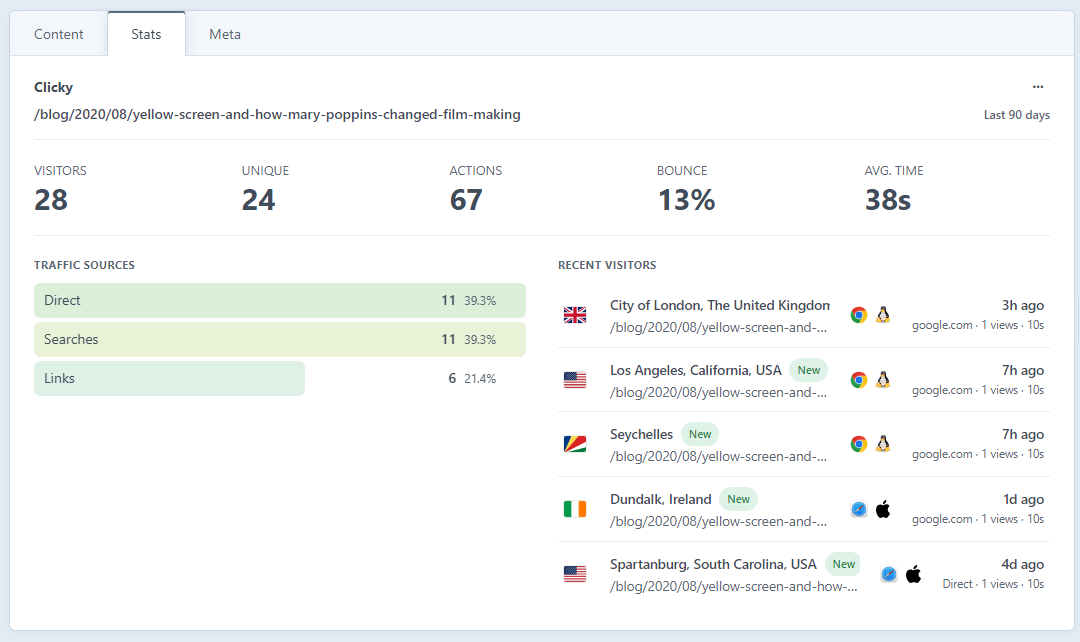
The Clicky Analytics Page Stats field shows an individual entry's own analytics right inside the entry editor: no need to leave Craft or go cross-referencing Clicky by hand.
Adding the field
- Go to Settings → Fields and create a new field of type Clicky Analytics Page Stats (or add it directly to a field layout).
- Add the field to the field layout of the entry type(s) you want to track, typically in a tab or sidebar position on your blog posts, news articles or landing pages.
- Edit an entry of that type. The field renders that entry's analytics, derived live from the entry's URL.
What it shows
For the entry's URL, over the configured date range, the field surfaces:
- Visitors and unique visitors
- Actions (page views / events)
- Bounce rate
- Average visit time
- Traffic sources for the page
- A short list of recent visitors to the page
Notes
- Stores no data. The field has no stored value — everything's fetched live from Clicky (and cached briefly per the cache duration setting). It won't show up in element exports or GraphQL as content.
- Needs a URL. The field works out stats from the entry's URL, so it only works on entries that have a public URL. Drafts and entries without a route won't have anything to report yet.
- Date range. The field uses the plugin's default date range unless you override it.
If you'd rather read the same per-page data in a template instead of the editor, see craft.clickyAnalytics.pageStats().