Colour Schemes
Clicky Analytics ships with five accent palettes that re-theme every widget, the page-stats field and the charts in one go, from a single setting. Choose one under Settings → Plugins → Clicky Analytics → Colour scheme, or set colorScheme in config/clicky-analytics.php.
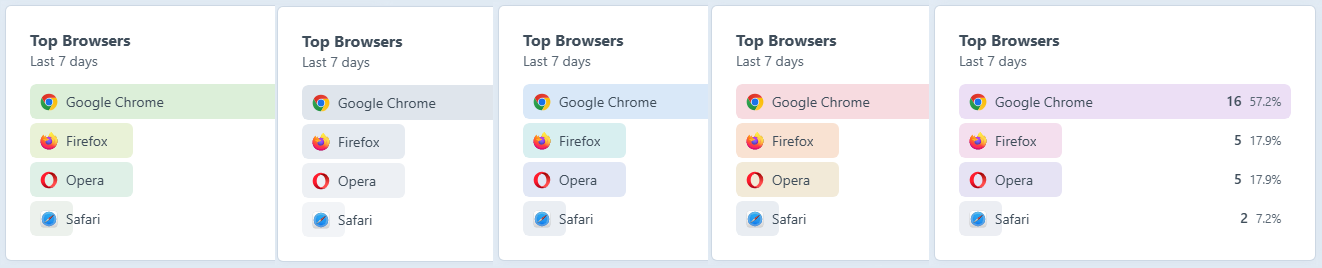
| Scheme | Key | ||
|---|---|---|---|
| Clicky Analytics |
clicky | Warm (the default) | |
| Ocean |
ocean | Blue | |
| Monochrome |
mono | Greyscale | |
| Forest |
forest | Green | |
| Berry |
berry | Purple |
The chosen scheme drives:
- A primary accent used for chart lines and the donut's first slice.
- A set of per-role accents, so the sources, countries, browsers, etc. widgets each stay visually distinct rather than sharing one flat colour.
- Four rank-tint colours, used to shade ranked-list rows by position (1st through 4th and beyond) rather than by widget role, so the top few results stand out and the long tail stays quiet.
- A secondary accent, used for the New vs Returning donut's second slice.
- A soft fill, a light pastel used for the Overview chart's area fill.
If you're building your own front-end dashboards, you can read all of these same colours through the craft.clickyAnalytics Twig variable.
Brand logos & flags
Separate from the colour scheme, ranked rows are decorated with self-hosted SVG assets so they look the same on every operating system:
- Country flags
- Browser logos
- Operating-system logos
- Search-engine logos
These are bundled with the plugin and published through Craft's asset manager, so there's no call-out to an external CDN.