Plugin Settings
The plugin offers a handful of configuration options in the Matrix Block Anchor plugin settings:
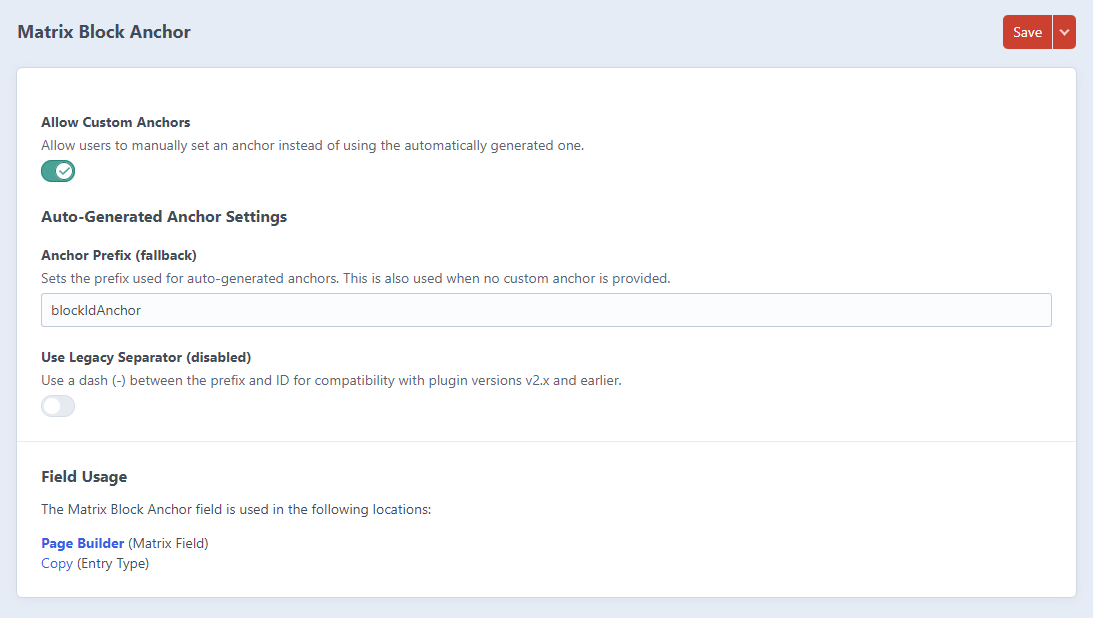
Custom Anchor Settings
The plugin includes an "Allow Custom Anchors" setting that lets editors create their own anchor IDs instead of using the auto-generated ones. That's useful for:
- Creating meaningful, human-readable anchor links
- Improving SEO with descriptive anchor text
- Maintaining consistent anchor links even if content is reordered
When custom anchors are enabled:
- Anchor IDs must start with a letter
- Anchor IDs can only contain letters, numbers, hyphens (
-), and underscores (_) - Anchor IDs must not contain spaces or other special characters
- Anchor IDs must not exceed 100 characters
- Each anchor must be unique within the same entry
Anchor Prefix
The default prefix for anchor IDs is blockIdAnchor, which you can change in the plugin settings. In most cases, the default works fine. A prefix is required because an ID can't start with a number, and block IDs are numbers.
Legacy Separator Setting
The "Use Legacy Separator" setting is for backward compatibility if you're upgrading from an older plugin version (prior to v3.0.0).
For new installations: Leave this disabled (default). Anchors with a prefix will generate cleanly as #blockIdAnchor123 instead of #blockIdAnchor-123.
For existing installations upgrading from v2.x or earlier: If you have existing anchors in the format #blockIdAnchor-123 (with a leading dash when no prefix was set), enable this setting to maintain the same format and prevent broken links.
Field Usage
Shows you where the Matrix Block Anchor field is used across your site.